What is zsh?
Shell 的类型有很多种,例如 Linux 和 MacOS 下默认的是 Bash。虽然 Bash 的功能已经足够完备,但对于以懒惰为美德的程序员来说,其提示功能不够强大,界面也不够酷(zhuang)炫(bi)。
而 zsh 作为 Shell 的一种,功能极其强大,但因为配置过于复杂,起初只有极客才在用。这时,开源项目 oh-my-zsh 出现了,只需要简单的安装配置,就能用上炫酷好用的 zsh 了。
对我而言,zsh 最好用的地方是语法高亮和命令提示。
1 安装 oh-my-zsh
Step 1. 首先检查系统目前支持的shell
如果 zsh 已经存在(MacOS 一般自带 zsh),可以直接跳过安装第二步。
Step 2. 如果没有 zsh,需要自行安装
# on MacOS
$ brew install zsh

# on Linux
$ yum install zsh
Step 3. 安装 oh-my-zsh
$ sh -c "$(curl -fsSL https://raw.github.com/robbyrussell/oh-my-zsh/master/tools/install.sh)"
Step 4. 切换到 zsh
2 安装拓展
安装语法高亮和命令提示
# syntax highlighting
$ git clone https://github.com/zsh-users/zsh-syntax-highlighting.git ${ZSH_CUSTOM:-~/.oh-my-zsh/custom}/plugins/zsh-syntax-highlighting

# zsh-autosuggestions
$ git clone https://github.com/zsh-users/zsh-autosuggestions ${ZSH_CUSTOM:-~/.oh-my-zsh/custom}/plugins/zsh-autosuggestions
接着,修改 zsh 配置
$ vim ~/.zshrc

plugins=(git zsh-autosuggestions zsh-syntax-highlighting)
echo "export TERM=xterm-256color"  # 使autosuggestions半透明

export HOMEBREW_NO_AUTO_UPDATE=true # no update when use brew
最后,使配置生效!
3 主题推荐时间!
推荐一个炒鸡优雅的主题组合:dracula + ys!
dracula 是一个颜值超高的 iTerm2 主题!
dracula-theme, a dark theme for all the things~
安装方法见官网,很简单不再赘述。
然后是一个好用也好看的 oh-my-zsh 主题: ys!
切换方法非常简单,修改 ~/.zshrc 里面的 ZSH_THEME="ys" 即可。
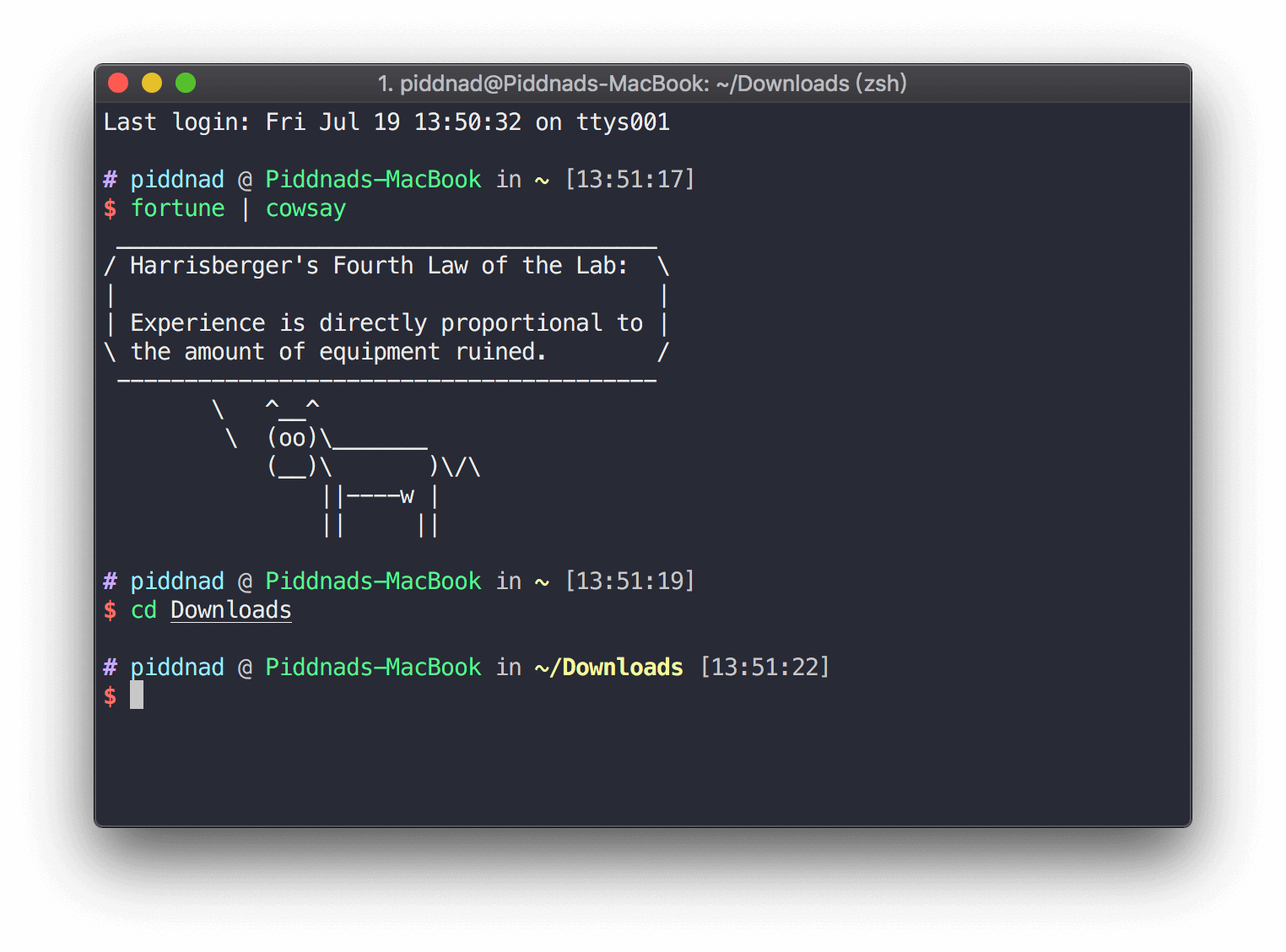
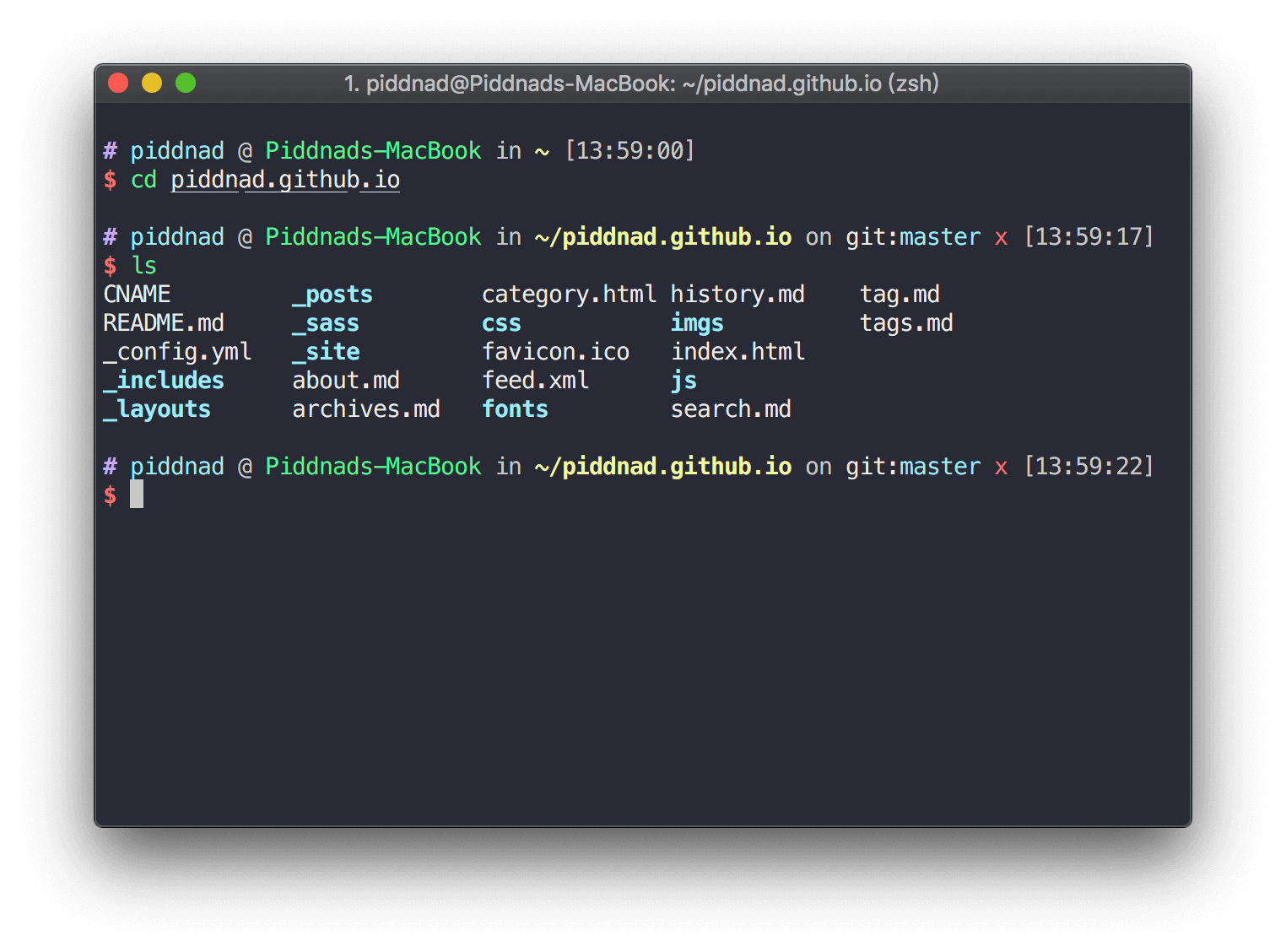
使用效果展示:
4 简单使用心得!
-
zsh 的语法高亮,并不是传统基于正则表达式的色彩高亮,而是真的会判断你输入的到底是啥。白色代表普通命令或者程序,红色代表错误命令。
-
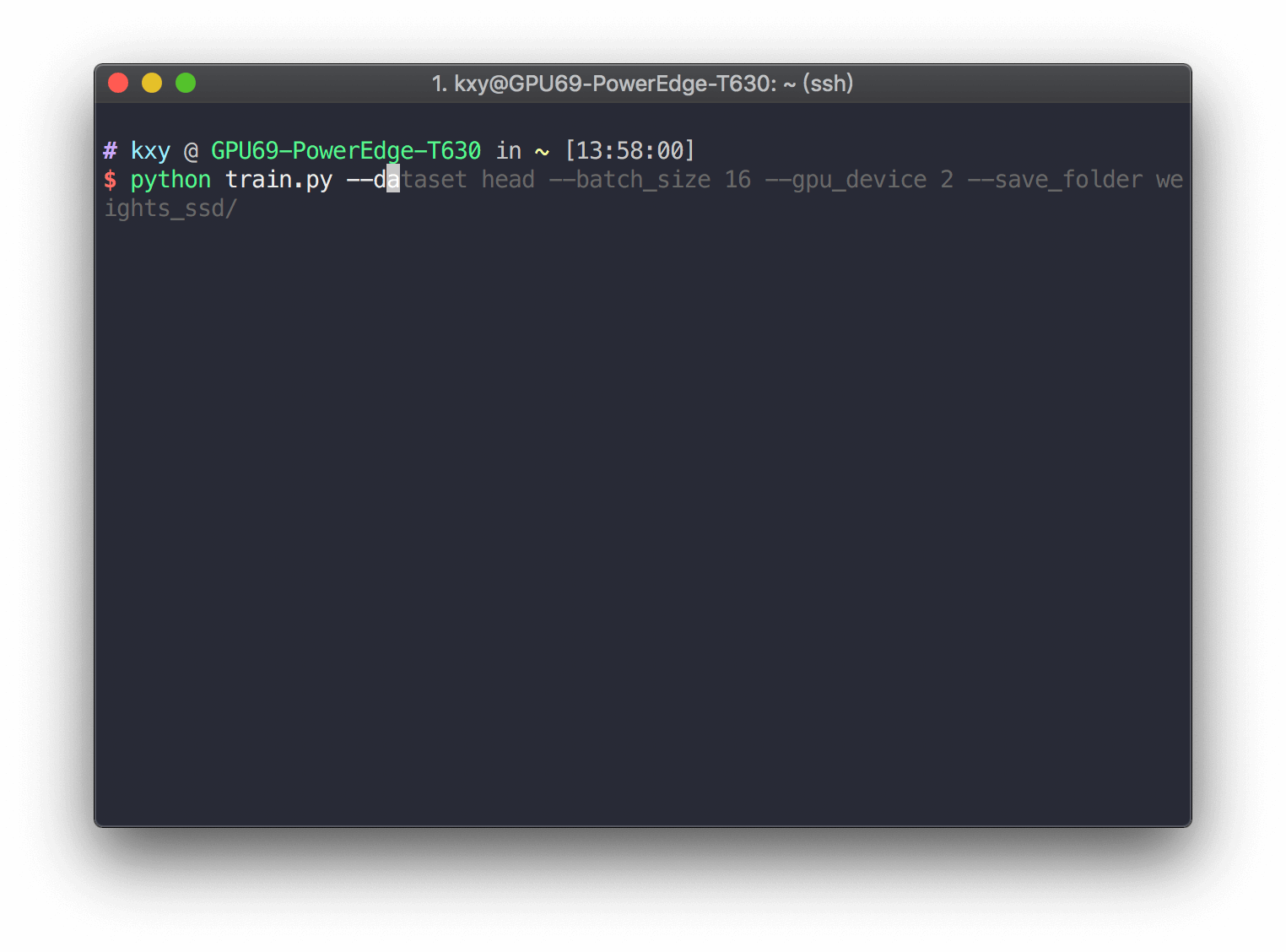
命令提示功能炒鸡好用!当你输入命令时,会自动进行命令的提示,且随着你动态输入每一个字母不断变化。按CTRL+F 采纳提示内容。
这个命令提示是基于你的历史命令数据库进行分析的,随着你输入的命令越来越多,提示将会越来越准确和顺手。
-
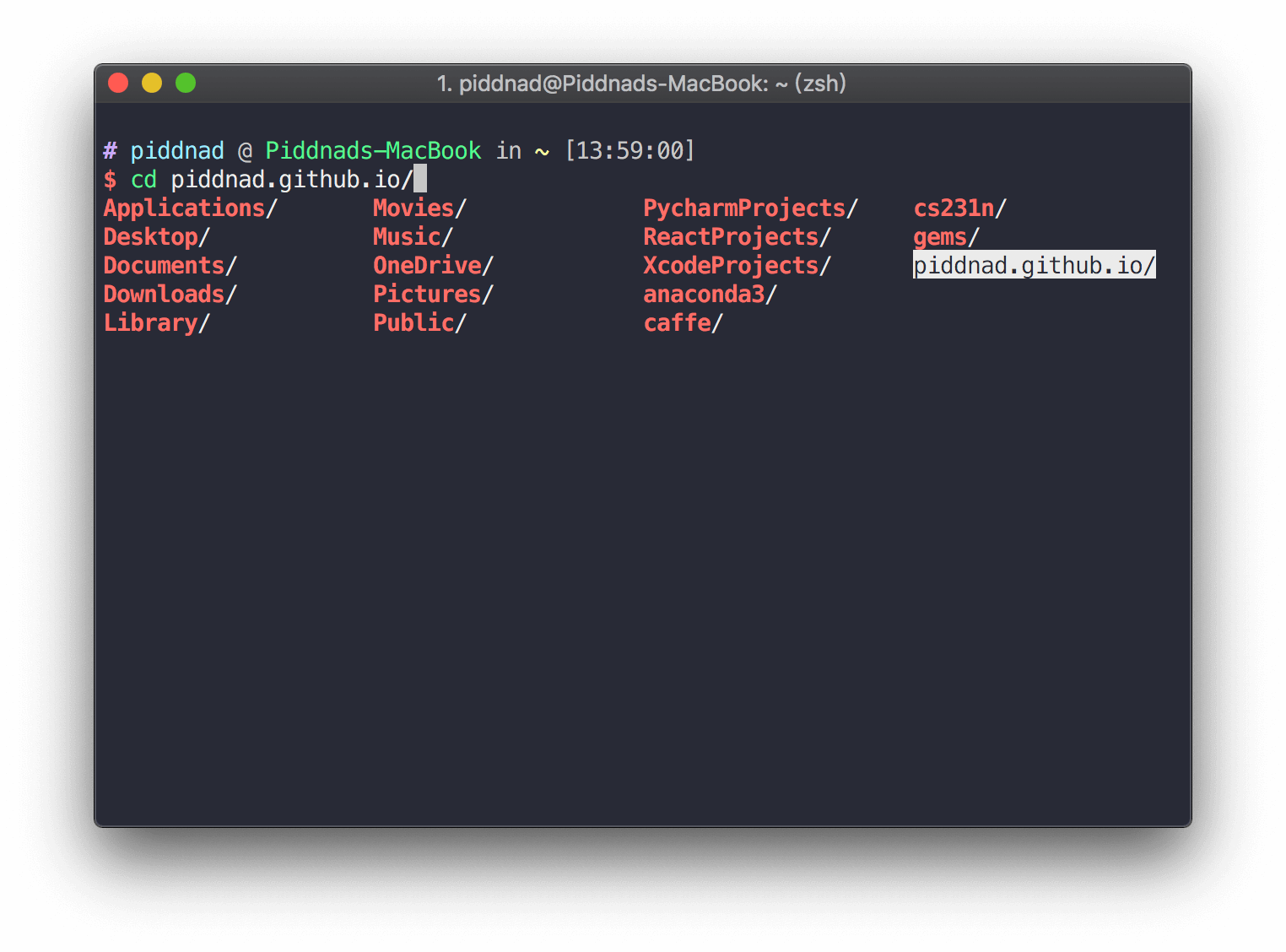
智能补全:连续敲击两次 TAB 键 zsh 给你一个补全目录,可以上下左右选择。
还有很多好用的功能,可以参考一个知乎问题 “为什么说 zsh 是 shell 中的极品?”。
参考
- https://wyydsb.xin/other/terminal.html
- https://www.zhihu.com/question/21418449/answer/300879747
What is zsh?
There are many types of shells — Linux and macOS both default to Bash. Bash is perfectly capable, but for programmers who consider laziness a virtue, its autocomplete is weak and its look is frankly boring.
zsh is an incredibly powerful shell, but its manual configuration was complex enough that only hardcore geeks bothered with it — until oh-my-zsh came along. With a single install command, you get a polished, feature-rich zsh setup with almost no effort.
For me, the two killer features are syntax highlighting and command autosuggestions.
1 Installing oh-my-zsh
Step 1. Check which shells your system supports:
If zsh is already listed (macOS ships with it), skip Step 2.
Step 2. Install zsh if it's missing:
# on macOS
$ brew install zsh

# on Linux
$ yum install zsh
Step 3. Install oh-my-zsh:
$ sh -c "$(curl -fsSL https://raw.github.com/robbyrussell/oh-my-zsh/master/tools/install.sh)"
Step 4. Switch your default shell to zsh:
2 Installing Plugins
Install syntax highlighting and autosuggestions:
# syntax highlighting
$ git clone https://github.com/zsh-users/zsh-syntax-highlighting.git ${ZSH_CUSTOM:-~/.oh-my-zsh/custom}/plugins/zsh-syntax-highlighting

# autosuggestions
$ git clone https://github.com/zsh-users/zsh-autosuggestions ${ZSH_CUSTOM:-~/.oh-my-zsh/custom}/plugins/zsh-autosuggestions
Edit your zsh config to enable them:
$ vim ~/.zshrc

plugins=(git zsh-autosuggestions zsh-syntax-highlighting)
echo "export TERM=xterm-256color"  # makes autosuggestions semi-transparent

export HOMEBREW_NO_AUTO_UPDATE=true # no update when use brew
Apply the changes:
3 Theme Recommendation
My go-to combination: dracula (iTerm2 color scheme) + ys (oh-my-zsh theme).
dracula-theme is a gorgeous dark theme for iTerm2. Installation is straightforward — check their site.
For the oh-my-zsh theme, switch to ys by setting ZSH_THEME="ys" in ~/.zshrc.
Here's what it looks like:
4 Tips from Daily Use
-
zsh's syntax highlighting is smarter than regex-based coloring — it actually evaluates your input. White means a valid command, red means an error.
-
Autosuggestions are incredibly handy. As you type, a ghost suggestion appears and updates with each keystroke. Press Ctrl+F to accept it.
Suggestions are drawn from your command history, so they get more accurate the more you use the shell.
-
Smart tab completion: press Tab twice and zsh shows a navigable menu you can move through with arrow keys.
For more features, this Zhihu thread is a good read: “Why is zsh considered the best shell?”
References
- https://wyydsb.xin/other/terminal.html
- https://www.zhihu.com/question/21418449/answer/300879747