Scrapy小练习之新闻爬虫
写在前面
最近在暑期学校选的一门课需要从网上爬取文本数据,借此机会复习一下 Python 网络爬虫~
使用的是自己之前用过的 Scrapy 框架,以下是这次自己的学习 & 动手过程。
1 复习时间
网络爬虫介绍
在介绍框架之前,简单介绍一下网络爬虫(Web Crawler)。
当我们上网时,浏览的网页上有很多形形色色的信息,我们可以手动收集(复制粘贴or下载)我们需要的信息。但是,当信息量比较多就显得很麻烦了,有没有一种方式可以自动且快捷地把一堆相关网页上的海量信息下载下来呢?有,那就是网络爬虫。
网络爬虫是一种从 Web 上自动下载网页的程序——网络爬虫把一个或多个”种子网页”作为输入,然后经过下载、分析和扫描等处理过程来获取新链接。对于指向未下载网页的链接,将它们加到一个中央 URL 队列中。然后,从队列中选择一个新的网页进行下载……如此往复,就像蛛网一样访问并下载到所有延伸的网页,在这个过程中,分析并提取网页中有用的数据,以结构化的方式存储。
事实上,所有我们所知的主要的搜索引擎(百度、Google…)都使用爬虫,有效的网络爬虫是现代搜索引擎取得成功的关键。
Scrapy是什么
Scrapy 是由 Python 语言开发的一个快速、高层次的屏幕抓取和 Web 抓取框架,用于抓取 Web 站点并从页面中提取结构化的数据。相比于传统的爬虫来说,基于 Scrapy 框架的爬虫更加结构化,同时也更加高效,能完成更加复杂的爬取任务。
Scrapy架构概览
Scrapy 框架的架构如图所示。
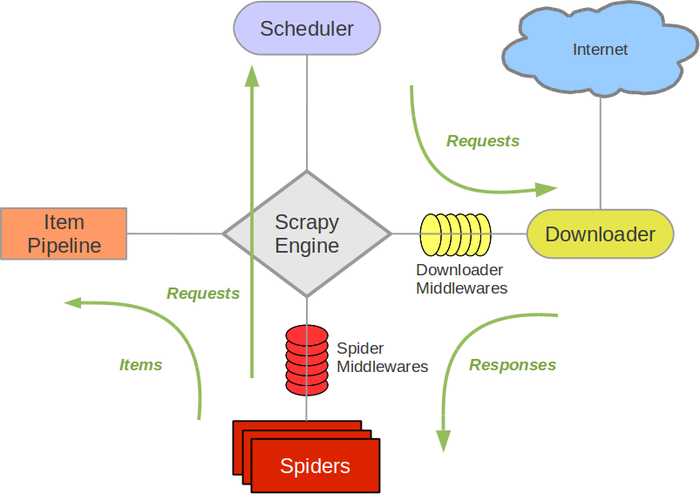
图中,绿线代表数据流向,整个数据流由中央的 Scrapy Engine 控制,具体工作流程是:
- 从初始 URL 开始,Scheduler 将第一个要爬取的URL通过下载中间件转发给 Downloader 进行下载。
- 下载后页面后,Downloader 将 Response 通过下载中间件和 Spider 中间件交给 Spider 进行分析。爬虫的核心功能代码在此发挥作用。
- Spider 处理后获得两类信息:第一类是需要进一步抓取的链接,也就是新的 request,传回 Scheduler;另一类是处理出来的 item,交给 Item Pipeline 进一步处理和存储。
- 重复直到 Scheduler 中没有更多的 request。
2 小练习 - 新闻爬虫
首先写一个新闻爬虫练练手。
明确需求
由于是一个小项目,所以需求比较简单。目标定为爬取网易的科技新闻(tech.163.com),要获取的项目包括以下几项:
- 标题
- 发表时间
- 来源
- 内容
- 链接
接下来,coding time~
创建项目
输入如下命令:
scrapy startproject NewsSpider  # 创建项目
cd NewsSpider
scrapy genspider technews tech.163.com  # 创建一个爬虫
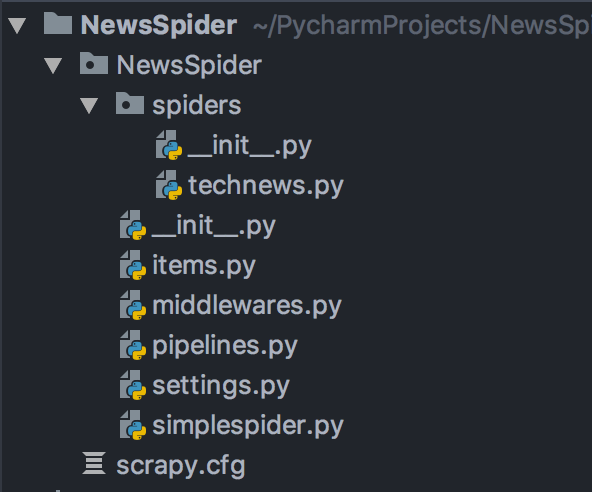
项目的目录结构:
定义Item
Item是保存爬取到的数据的容器,其使用方法和 python 字典类似。根据需求分析,我们在 items.py 文件中写入如下内容:
import scrapy

class NewsspiderItem(scrapy.Item):
    # define the fields for your item here like:
    # name = scrapy.Field()
    title = scrapy.Field()
    date = scrapy.Field()
    source = scrapy.Field()
    content = scrapy.Field()
    url = scrapy.Field()
    pass
编写爬虫
Spider 是用于从网站爬取数据的类,也是我们整个工程的核心。
每一个 Spider 必须继承 Scrapy 内置的爬虫类。这里,我们选择继承 CrawlSpider,CrawlSpider 是爬取一般网站常用的 spider,其定义了一些规则来提供跟进链接的方便机制。
Spider 代码如下:
class TechnewsSpider(CrawlSpider):
    name = 'technews'
    allowed_domains = ['tech.163.com']
    start_urls = ['https://tech.163.com/']

    rules = [
        Rule(LinkExtractor(
            allow=(
                ('https://tech\.163\.com/[0-9]+/.*$')
            ),
        ),
        callback="parse_item",
        follow=True)
    ]
具体来讲,我们需要定义爬取规则(rules),这里用到了三个规则:
link_extractor定义了如何从爬取到的页面提取链接。callback是一个函数,从link_extractor中每获取到链接时将会调用该函数。该回调函数接受一个response作为其第一个参数, 并返回一个包含Item以及(或)Request对象的 list。个人理解就是替代最简单的 Spider 中的 parse,根据不同内容的 Xpath 路径从页面中提取内容。follow是一个布尔值,指定了根据该规则从 response 提取的链接是否需要跟进。
接下来我们需要定义最关键的 parse_item() 函数,提取我们想要的 item。
- title:新闻标题在页面的 h1 标签内。
- date:发表时间在类名为
'post_time_source'的 div 标签内,但是包含其他无关字符,因此需要使用正则表达式进行匹配。 - source:来源在 id 为
'ne_article_source'的a标签内。 - content:提取内容需要费点力气,通过观察发现 content 都在 id 为
'endText'的 div 标签里的 p 标签内,但是只有普通的 p 标签才是正文,因此使用p[not(@class)]进行过滤,最后使用''.join()将整个文章合并。 - url:直接从 response 的 url 属性获得。
最终代码如下:
    def parse_item(self, response):
        item = NewsspiderItem()
        item['title'] = response.xpath("//h1/text()").extract()
        item['date'] = response.xpath("//div[@class='post_time_source']/text()").re(
            r'[0-9]*-[0-9]*-[0-9]* [0-9]*:[0-9]*:[0-9]*')
        item['source'] = response.xpath("//a[@id='ne_article_source']/text()").extract()
        item['content'] = ''.join(response.xpath("//div[@id='endText']/p[not(@class)]/text()").extract())
        item['url'] = response.url

        yield item
修改Settings
在开始爬取之前,还需要在 settings.py 里面进行一些简单的设置。
BOT_NAME = 'NewsSpider'

SPIDER_MODULES = ['NewsSpider.spiders']
NEWSPIDER_MODULE = 'NewsSpider.spiders'

ROBOTSTXT_OBEY = True

COOKIES_ENABLED = False  # 禁用Cookie避免被封

FEED_EXPORT_ENCODING = 'utf-8'  # 输出的编码格式为uft-8
FEED_EXPORT_FIELDS = ["title", "date", "source", "content", "url"]  # 输出的字段顺序

DOWNLOAD_DELAY = 0.01  # 增加爬取延迟,降低被爬网站服务器压力
CLOSESPIDER_ITEMCOUNT = 1000  # 爬取的新闻条数上限
运行效果
最后,运行爬虫:
scrapy crawl technews -o news.csv -t csv
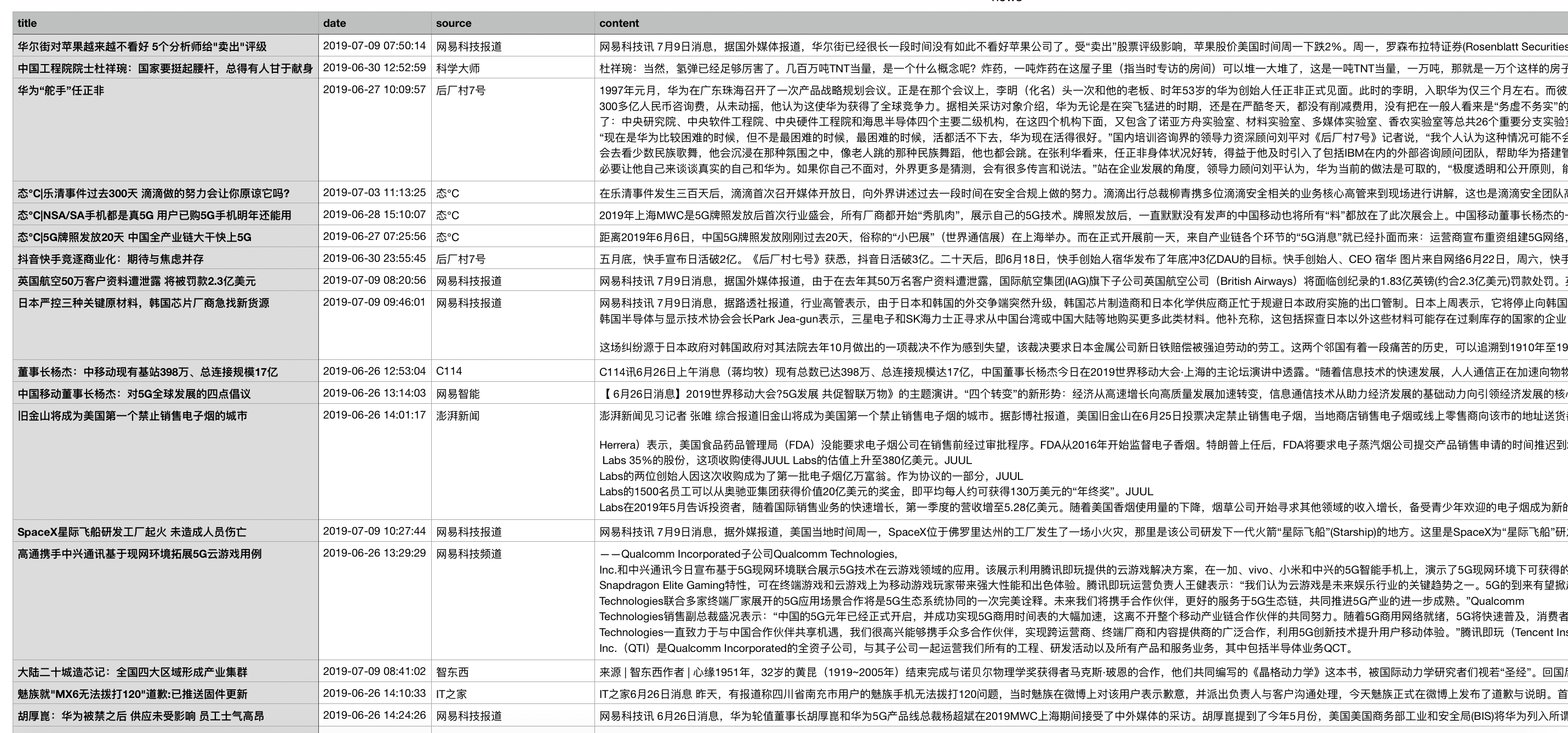
爬取的新闻被成功保存在csv文件中~
3 新闻爬虫 - 拓展
经过了上述的步骤,成功爬取到了一些新闻,但是还存在一些问题,那就是:我的目标是爬取 1000 条左右新闻,但每当运行爬虫,总是只能爬到 80 条左右的新闻条目,到底出了什么问题呢?
一开始,我猜测是网易新闻服务器端的限制——因为识别出了正在访问的是爬虫,所以只允许爬 80 条新闻。但是,当我尝试修改 settings.py 里面各种参数(例如设置USER_AGENT、修改COOKIES_ENABLED、ROBOTSTXT_OBEY的值等),发现结果都没有任何变化。因此,这个猜测并不成立。
后来上网查阅资料,我找到了出现这个问题的真正原因:网易新闻页面的滚动新闻是通过 js 加载的,而 Scrapy 无法直接爬取动态生成的页面。所以,之前爬到的 80 个条目应该是 html 页面上静态的内容。
因此,解决方法大概有下面三种方式:
- 直接爬一个有新闻列表的静态页面
- 通过网易新闻的新闻获取 API 爬取
- 搭配其他工具解析页面上的 JS,然后爬动态渲染后的页面
我动手尝试了前面两种方式。最后一种方式可以选择使用 Splash 等工具,具体教程可以看这里。
直接爬一个有新闻列表的静态页面(笨办法)
这种方式最简单粗暴,但是不足的地方就是需要去寻找有没有这样的新闻列表页面。所幸,经过探索,我发现网易科技新闻的一些板块里有历史回顾页面,这里的新闻列表是静态页面,可以直接爬取。
将之前的 Spider 修改为:
class TechnewsSpider(CrawlSpider):
    name = 'technews'
    allowed_domains = ['163.com']
    start_urls = ['https://news.163.com',
                  'http://tech.163.com/special/gd2016/',
                  'http://tech.163.com/special/tele_2016_02/',
                  'http://tech.163.com/special/it_2016_02/',
                  'http://tech.163.com/special/internet_2016_02/',
                  'http://digi.163.com/news/',
                  'https://mobile.163.com/']

    rules = [
        Rule(
            LinkExtractor(
                allow=(
                    ('tech\.163\.com/[0-9]+/.*$'),
                    ('news\.163\.com/[0-9]+/.*$'),
                    ('digi\.163\.com/[0-9]+/.*$'),
                    ('mobile\.163\.com/[0-9]+/.*$'),
                    ('tech\.163\.com/special/gd2016.*$'),
                    ('tech\.163\.com/special/tele_2016.*$'),
                    ('tech\.163\.com/special/it_2016.*$'),
                    ('tech\.163\.com/special/internet_2016.*$'),
                    ('digi\.163\.com/special/.*$')
                ),
            ),
            callback="parse_item",
            follow=True
        )
    ]

    def parse_item(self, response):
        item = NewsspiderItem()
        if 'special' not in response.url:  # 不是新闻列表
            item['title'] = response.xpath("//h1/text()").extract()
            item['date'] = response.xpath("//div[@class='post_time_source']/text()").re(
                r'[0-9]*-[0-9]*-[0-9]* [0-9]*:[0-9]*:[0-9]*')
            item['source'] = response.xpath("//a[@id='ne_article_source']/text()").extract()
            item['content'] = ''.join(response.xpath("//div[@id='endText']/p[not(@class)]/text()").extract()).replace('\n', '')
            item['url'] = response.url

        yield item
- start_urls 定义了开始爬取的一些新闻列表页面
- rules 内 LinkExtractor 的 allow 规则内规定了允许爬取的新闻页面和新闻列表页面
- 最后,在 parse_item() 方法内判断当前的 reponse 是不是列表页面,如果不是就对其进行处理。
这样,最后爬到了1800多条新闻~
通过网易新闻的新闻获取 API 爬取(Bingo!)
上面的方法虽然好用,但是手工添加网页列表显得有些笨,不能体现我们的主观能动性。
使用 Chrome 开发者工具监控网络连接发现,当加载新闻列表时,浏览器向https://temp.163.com/special/00804KVA/cm_yaowen_03.js?callback=data_callback发起了一次 request,如下图。
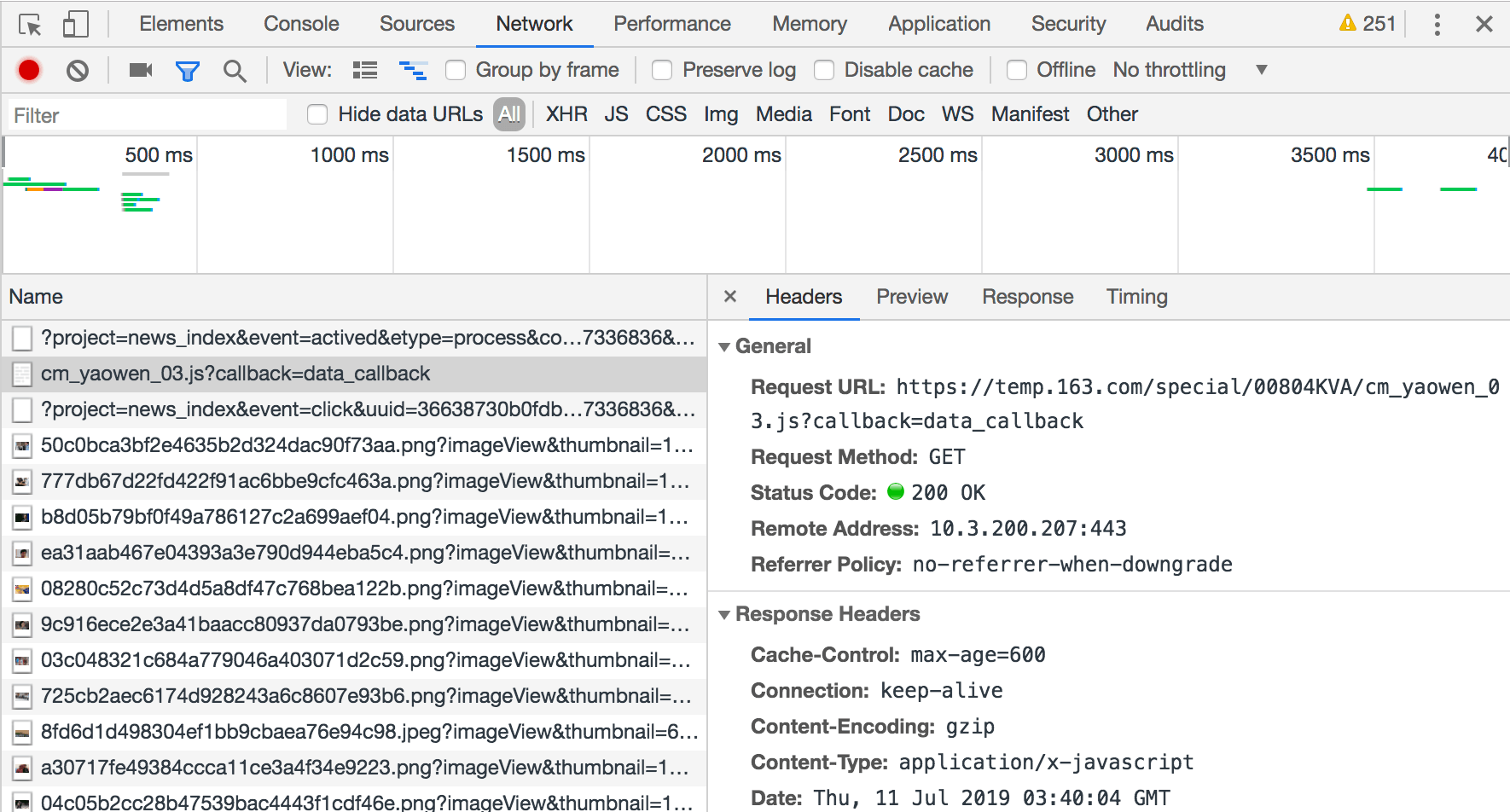
检查 response,发现返回的是新闻列表。
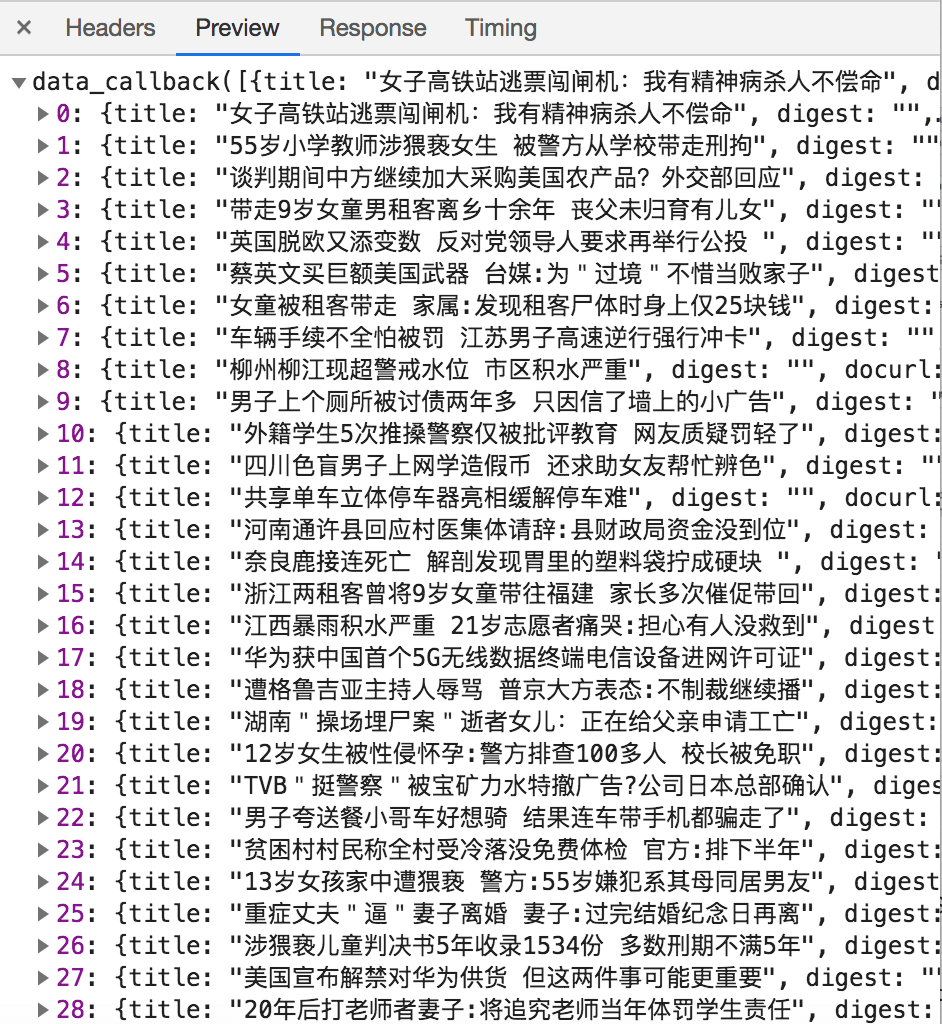
因此,上面请求的 url 应该是网易新闻的新闻获取api,推测 url 中的 cm_yaowen 是新闻类别,03 指的是第3页。
基于以上分析,我们可以构造我们自己的请求 url 格式如下:
http://temp.163.com/special/00804KVA/ + 类别_页 + .js?callback=data_callback
其中,类别为 cm_yaowen(要闻)、cm_guonei(国内新闻)、cm_tech(科技)等等。打开特定的 url,就可以获取该页所有新闻的 url,然后进一步爬取,剩下的工作就很简单了~
Spider 定义如下:
# -*- coding: utf-8 -*-
import scrapy
from scrapy.spiders import CrawlSpider, Rule
from scrapy.linkextractors import LinkExtractor
from NewsSpider.items import NewsspiderItem
import json


class NewsxApiSpider(scrapy.Spider):
    '''
    通过新闻获取API爬取
    '''

    name = 'newsxapi'
    allowed_domains = ['163.com']
    # start_urls = ['http://news.163.com/special/0001220O/news_json.js']

    start_news_category = ["guonei", "guoji", "yaowen", "shehui", "war", "money",
                           "tech", "sports", "ent", "auto", "jiaoyu", "jiankang", "hangkong"]
    news_url_head = "http://temp.163.com/special/00804KVA/"
    news_url_tail = ".js?callback=data_callback"

    def start_requests(self):
        for category in self.start_news_category:
            category_item = "cm_" + category
            for count in range(1, 20):  # 每个版块最多爬取前20页数据
                if count == 1:
                    start_url = self.news_url_head + category_item + self.news_url_tail
                else:
                    start_url = self.news_url_head + category_item + "_0" + self.news_url_tail
                yield scrapy.Request(start_url, meta={"category": category}, callback=self.parse_news_list)

    def parse_news_list(self, response):
        # 爬取每个Url
        json_array = "".join(response.text[14:-1].split())  # 去掉前面的"data_callback"
        news_array = json.loads(json_array)
        category = response.meta['category']
        for row in enumerate(news_array):
            news_item = NewsspiderItem()
            row_data = row[1]
            news_item["url"] = row_data["tlink"]

            yield scrapy.Request(news_item["url"], meta={"news_item": news_item},
                                 callback=self.parse_news_content)

    def parse_news_content(self, response):
        # 解析新闻页面
        source = "//a[@id='ne_article_source']/text()"
        content_path = "//div[@id='endText']/p/text()"
        # 只提取新闻<p>标签中的内容
        content_list = []
        for data_row in response.xpath(content_path).extract():
            content_list.append("".join(data_row.split()))
        content_list = "\"".join(content_list)
        news_item = response.meta['news_item']
        news_item["content"] = content_list
        news_item["source"] = response.xpath(source).extract_first()
        news_item['title'] = response.xpath("//h1/text()").extract()
        news_item['date'] = response.xpath("//div[@class='post_time_source']/text()").re(
            r'[0-9]*-[0-9]*-[0-9]* [0-9]*:[0-9]*:[0-9]*')

        yield news_item
通过 api 进行爬取不需要手动设置网页列表。可以设置每天定时运行,轻轻松松获得大量数据。
彩蛋
在一个知乎回答 提到了网易新闻的采集页面,json 中包含了新闻标题、url 等信息。因此可以直接使用这个 json 文件搞点事情。
新建一个 Spider:
# -*- coding: utf-8 -*-
import scrapy
from scrapy.spiders import CrawlSpider, Rule
from scrapy.linkextractors import LinkExtractor
from NewsSpider.items import NewsspiderItem
import json


class NewplusSpider(scrapy.Spider):
    name = 'newsplus'
    allowed_domains = ['163.com']
    start_urls = ['http://news.163.com/special/0001220O/news_json.js']

    news_list = []

    def parse(self, response):
        data = json.loads(response.text.replace("var data=", "").replace("[]]};", "[]]}"), encoding="uft-8")
        for temp_list in data["news"]:
            if len(temp_list):  # 非空
                self.news_list += temp_list

        for news in self.news_list:
            url = news['l']
            print(url)
            yield scrapy.Request(url=url, callback=self.parse_news)

    def parse_news(self, response):
        item = NewsspiderItem()
        item['title'] = response.xpath("//h1/text()").extract()
        item['date'] = response.xpath("//div[@class='post_time_source']/text()").re(
            r'[0-9]*-[0-9]*-[0-9]* [0-9]*:[0-9]*:[0-9]*')
        item['source'] = response.xpath("//a[@id='ne_article_source']/text()").extract()
        # item['content'] = ''.join(response.xpath("//div[@id='endText']/p[not(@class)]").xpath('string(.)').extract())
        item['content'] = ''.join(response.xpath("//div[@id='endText']/p[not(@class)]/text()").extract()).replace('\n', '')
        item['url'] = response.url

        yield item
- 起始 url 为网易新闻的采集页面
- parse() 方法对 response 中的 json 文件进行处理,提取其中的新闻条目存入 self.newslist。
- 最后,遍历 self.newslist,对每一条新闻 url 调用 parse_news() 进行爬取即可~
后记
爬虫这种技术的出现有其合理性,只要 Web 技术还存在,爬虫技术就不会消亡。然而随着技术发展,爬虫(Spider)和反爬虫(Anti-Spider),甚至反反爬虫(Anti-Anti-Spider)的斗争可能是永无止境的。
这次实现的几个新闻爬虫其实还是比较简单的,将来爬取别的网站时,可能还要考虑到反爬虫的问题。期待在之后的实践中能更进一步,学会爬虫的更多技巧。
这几天沉迷爬虫,之后的博客将会尝试一下爬取网页上的图片,敬请期待~
“最近对很多网络相关的技术产生了兴趣,例如 SSR,网络爬虫等等。但因为大二时没有好好听蒋砚军老师讲的计算机网络课,所以现在对一些协议方面的细节还是很模糊,真的好后悔呀!暑假快开始了,这个假期要好好恶补一下计网相关的知识。”
参考资料
有什么想法,留个评论吧: