写在前面

之前写了一篇 Scrapy 爬取网易新闻的博客,提到下次要尝试图片爬虫,于是,这篇博客诞生啦!(我怎么会鸽呢对不对)

事实上,对于网络爬虫,爬取图片和爬取文本大同小异,其思路大致都是:获取网页 -> 从网页中提取有用信息 -> 存储和进一步爬取。这次,我们要从网页中提取的信息从文本变成了图片文件的 URL。除此之外,为了存储图片文件,我们还需要编写 Item Pipline。

1 明确需求 & 定义Item

爬取的网页为妹子图(mzitu.com),毕竟爬妹子图比较有动力(?),既练习了爬虫又能看到很多妹子图。进入官网,我们发现网页中的图片是以图集的方式展示的,即一个图集下有一组主题相同的图片。那么,当图片保存到本地时,我们也创建成相似的文件结构,每张图片的路径是:根文件夹名/图集名称/1.jpg。

所以,我们需要定义三个 Item,分别是图集的名称,图集 URL(也就是图集首个页面的URL),以及图集中每张图片的 URL。编写 items.py 如下:

import scrapy

class MeizispiderItem(scrapy.Item):
    # define the fields for your item here like:
    name = scrapy.Field()
    url = scrapy.Field()  # 图集url
    image_urls = scrapy.Field()  # list,存储每张图片的url
    pass

2 爬虫编写

爬虫部分的编写总是最有趣的。事实上,爬虫虽然是整个项目的核心,但是当熟练后,编写爬虫的逻辑也是十分清楚的。

我们的爬虫开始于妹子图首页,然后根据首页的展示图,进入图集的内容页面。分析图集的内容页面,我们可以很容易的发现图集中每张图片的 URL 规律,即 https://www.mzitu.com+/图集编号+/图片编号 ——那么,当我们爬取了一个图集页面时,我们只需要获取每个图集有多少张图片,就可以获得该图集每张图片的 URL。

最后,使用 Chrome 检查页面上的元素,可以很容易的提取到图集标题、图集总图片数和当前图片 URL。
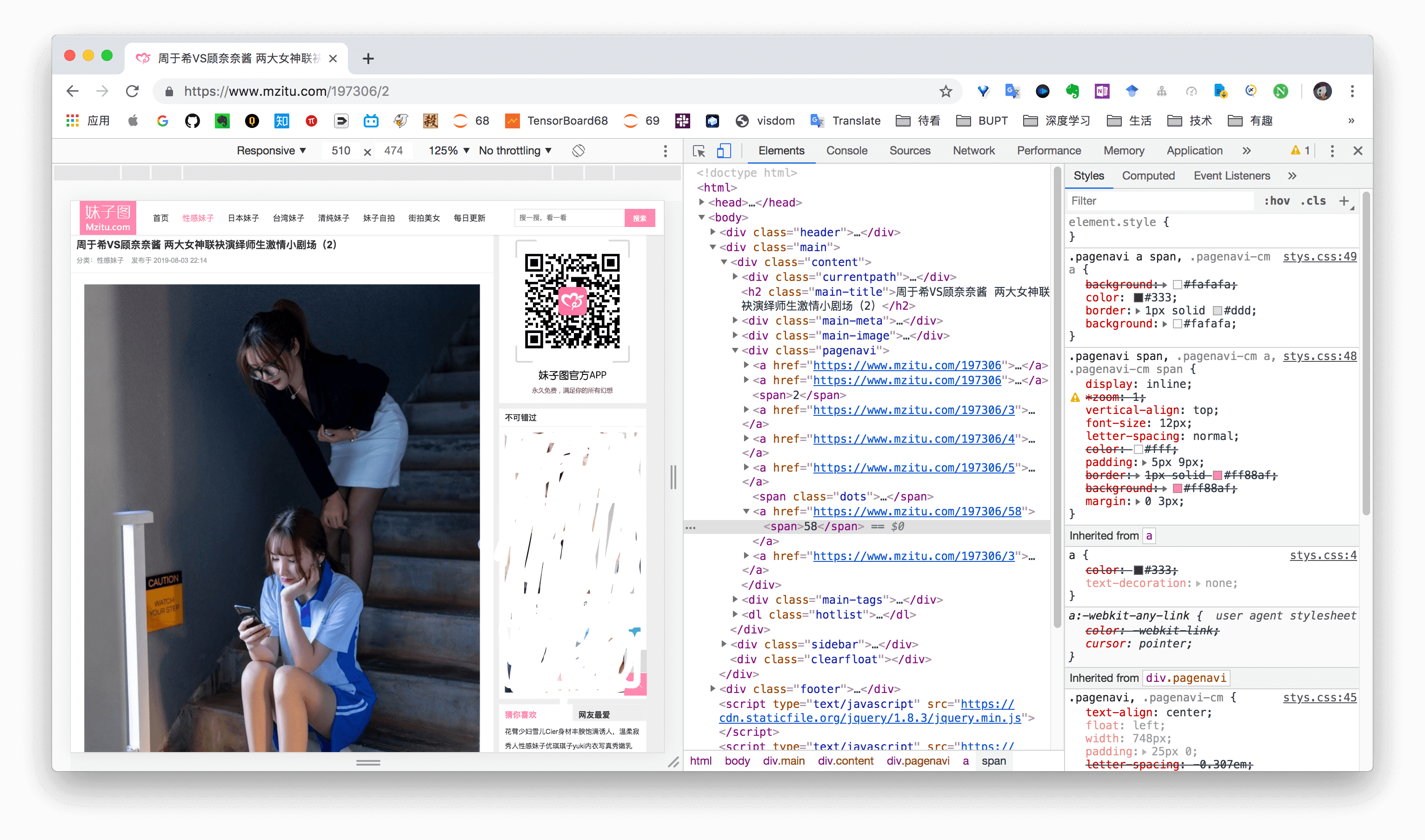
不是去幼儿园的车

总结一下,整个逻辑是:

  1. 根据首页打开某个图集,获取图集 URL,图集名称。
  2. 在图集内容页获取图片张数,构建循环分别获取每张图片所在的页面。
  3. 从图片所在页面获取每张图片的 URL,保存。

编写 spiders/mzitu.py 如下。

import scrapy
from MeiziSpider.items import MeizispiderItem

class MzituSpider(scrapy.Spider):
    name = 'mzitu'
    allowed_domains = ['mzitu.com']
    start_urls = ['https://www.mzitu.com/']
    img_urls = []
    first = True

    def parse(self, response):
        node_list = response.xpath("//ul[@id='pins']/li")
        for node in node_list:
            item = MeizispiderItem()
            item['name'] = node.xpath('./span/a/text()').extract_first()
            item['url'] = node.xpath('./span/a/@href').extract_first()
            yield scrapy.Request(url=item['url'], callback=self.detail_page, meta={"item": item})

    def detail_page(self, response):
        item = response.meta["item"]
        num = response.xpath('//div[@class="pagenavi"]/a[5]/span/text()').extract_first()  # 图片张数
        for i in range(1, int(num) + 1):
            if i == 1:
                yield scrapy.Request(url=item["url"], callback=self.parse_img_url, meta={"item": item}, dont_filter=True)
            else:
                yield scrapy.Request(url=item["url"] + '/'+str(i), callback=self.parse_img_url, meta={"item": item})
        item['image_urls'] = self.img_urls

    def parse_img_url(self, response):
        # 获取每张图片的url
        item = response.meta["item"]
        self.img_urls.append(response.xpath('//div[@class="main-image"]/p/a/img/@src').extract_first())  # 匹配图片的url
        yield item

3 Item Pipline编写

当 Item 在 Spider 中被收集之后,它将会被传递到 item pipeline,会按照一定的顺序执行对 item 的处理。在前面的工作中,我们获取了图集的名称和图集中每张图片的 URL,在这一步,我们实现将图片文件保存到本地。

Scrapy 提供了一个用来下载图片的 item pipeline ,叫做 ImagesPipeline,具体可以参考 https://scrapy-chs.readthedocs.io/zh_CN/latest/topics/images.html

在 pipelines.py 中,我们主要需要重写 ImagesPipeline 的三个方法:

  • file_path(self, request, response, info):每个下载的 item 调用此方法一次。 它返回源自指定 response 的文件的下载路径。我们可以覆盖此方法以自定义每个文件的下载路径。
  • get_media_requests(item, info):该方法对 image_urls 列表中的各个图片 URL 返回一个Request,这些请求将被管道处理,当它们完成下载后,结果将以 list of 2-element tuples 的形式传送到 item_completed() 方法。
  • item_completed(results, items, info):当一个 item 中的所有文件请求都完成下载或由于某种原因失败时被调用,返回的输出将发送到后续管道阶段,所以需要决定对当前 item 是返回还是 drop。

最终 pipelines.py 代码如下:

import scrapy
from scrapy.pipelines.images import ImagesPipeline
from scrapy.exceptions import DropItem


class MeizispiderPipeline(ImagesPipeline):

    def get_media_requests(self, item, info):
        for img_url in item['image_urls']:
            referer = item['url']
            yield scrapy.Request(img_url, meta={'item': item, 'referer': referer})

    def item_completed(self, results, item, info):
        image_paths = [x['path'] for ok, x in results if ok]
        if not image_paths:
            raise DropItem("Item contains no images")
        return item

    def file_path(self, request, response=None, info=None):
        item = request.meta['item']
        folder = item['name']
        image_guid = request.url.split('/')[-1]
        file_name = u'full/{0}/{1}'.format(folder, image_guid)
        return file_name

4 其他重要事项

针对防盗链的策略

“若你的爬虫只能欺负一些没有反爬虫限制的网站,那你就像用枪指着手无寸铁的平民一样,算神马英雄?要欺负就欺负反爬虫网站!”——某教程

经过上述步骤,我们的爬虫还是无法正确爬取到图片,为什么呢?这时由于,我们要爬的网站开启了防盗链技术。

什么是防盗链?简单的说防盗链就是为了防止A站把B站的资源直接拿去用,而做的一种阻止技术。防盗链的核心是判断你请求的地址是不是来自本服务器,若是,则给你图片,不是则不给。因此,我们每下载一张图片都先伪造一个来自要爬取服务器的请求,然后再进行下载。

改写 middlewares.py 中 MeizispiderDownloaderMiddleware 类的 process_request(self, request, spider) 方法如下即可:

    def process_request(self, request, spider):
        # 破解防盗链设置,see: http://www.scrapyd.cn/example/176.html
        referer = request.url
        if referer:
            request.headers['referer'] = referer

针对反爬虫的策略

直接运行爬虫,我们会发现还是会有大量的图片页面返回 403 错误,这是因为服务器设置了反爬虫。

最简单的应对策略是,设置同时发请求的数量以及下载的时间间隔,编辑 settings.py,根据情况设置 CONCURRENT_REQUESTS、DOWNLOAD_DELAY 等参数即可。

5 后记:框架与不使用框架的思考

事实上,对于这类简单的任务,不使用爬虫框架也能实现很好的效果,而且代码更少。例如,我又利用 Python 的 requests 和 BeautifulSoup 库,仅仅编写了不到60行代码,也能实现相同功能。

这的确应该引起我们的思考——使用框架就一定比不使用框架好吗?框架的好处在于提供了统一的项目结构,以及易用的接口和预设类,因此对于庞大的工程,使用框架会提供很好的 BUFF 加持。但是,爬虫这个东西其实说复杂也不复杂,对于一些简单的任务,有时不使用框架反而相比使用框架更加简洁、优美。

最后,附上不使用框架的爬虫代码,感受一下简洁的代码之美。

import requests
from bs4 import BeautifulSoup
import os
import time

start_url = ['https://www.mzitu.com/']
headers = {
    'cookie': 'Hm_lvt_dbc355aef238b6c32b43eacbbf161c3c=1562490131,1562490132,1564906073; Hm_lpvt_dbc355aef238b6c32b43eacbbf161c3c=1564977351',
    'referer': 'https://www.mzitu.com/185653',
    'user-agent': 'Mozilla/5.0 (Macintosh; Intel Mac OS X 10_14_6) AppleWebKit/537.36 (KHTML, like Gecko) Chrome/74.0.3729.169 Safari/537.36'
}

# 获取每个图集的URL
def get_album_info(url, headers):
    response = requests.get(url, headers=headers)
    soup = BeautifulSoup(response.text, 'lxml')
    for i in soup.find_all(target = '_blank'):
        if i.select('img'):
            album_url = i.get('href')
            get_images(album_url, headers)  # 下载该图集的图片
            time.sleep(2)
            print(album_url)
    if soup.select('a.next.page-numbers')[0].get('href'):  # 翻页
        next_url = soup.select('a.next.page-numbers')[0].get('href')
        get_album_info(next_url, headers)

# 下载图片
def get_images(album_url, headers):
    try:
        response_album = requests.get(album_url, headers=headers)
        soup_album = BeautifulSoup(response_album.text, 'lxml')
        album_name = soup_album.select('h2')[0].get_text()  # 图集名称
        page_num = soup_album.select('body > div.main > div.content > div.pagenavi > a:nth-of-type(5) > span')[0].get_text()  # 图片张数
        
        for i in range(1, int(page_num) + 1):
            page_url = album_url + '/' + str(i)
            response_page = requests.get(page_url, headers=headers)
            print(page_url)
            soup = BeautifulSoup(response_page.text, 'lxml')
            print('正在下载图集"{}"的第{}/{}张图片'.format(album_name, i, int(page_num)))
            print(soup.select('.main-image p a img')[0].get('src'))

            if soup.select('.main-image p a img')[0].get('src'):
                img_url = soup.select('.main-image p a img')[0].get('src')  # 获得图片URL
                file_name = 'Mzitu/{}'.format(album_name)
                if not os.path.exists(file_name):
                    os.makedirs(file_name)
                print(file_name)

                path ='%s/%s.jpg' % (file_name, i)
                with open(path, 'wb+') as f:
                    f.write(requests.get(img_url, headers=headers).content)   # 保存图片
                print(img_url)
    except:
        None

if __name__=='__main__':
    for url in start_url:
        get_album_info(url, headers)

Preface

In a previous post I built a Scrapy crawler for NetEase News and promised to try an image crawler next — so here it is.

Image crawling and text crawling are fundamentally the same: fetch a page → extract useful data → save and follow links. The only difference here is that the “useful data” we extract is image URLs instead of text. We also need to write an Item Pipeline to actually download and save the image files.

1 Requirements & Defining Items

The target site is mzitu.com, an image gallery site where photos are organized into albums — each album contains a set of thematically related images. We'll mirror this structure locally, saving each image at root_folder/album_name/1.jpg.

We need three Item fields: the album name, the album URL (the first page of the album), and a list of image URLs within the album. items.py:

import scrapy

class MeizispiderItem(scrapy.Item):
    name = scrapy.Field()
    url = scrapy.Field()       # album URL
    image_urls = scrapy.Field()  # list of individual image URLs
    pass

2 Writing the Spider

The spider starts at the homepage, navigates into each album's detail page, then collects individual image URLs.

After inspecting the site, the URL pattern for images is: https://www.mzitu.com/<album_id>/<image_number>. So once we know how many images an album contains, we can construct all image page URLs directly.

Chrome DevTools inspection

The overall flow:

  1. From the homepage, collect album URLs and names.
  2. On each album detail page, get the total image count and generate all per-image page URLs.
  3. On each image page, extract the actual image URL and yield the item.

spiders/mzitu.py:

import scrapy
from MeiziSpider.items import MeizispiderItem

class MzituSpider(scrapy.Spider):
    name = 'mzitu'
    allowed_domains = ['mzitu.com']
    start_urls = ['https://www.mzitu.com/']
    img_urls = []
    first = True

    def parse(self, response):
        node_list = response.xpath("//ul[@id='pins']/li")
        for node in node_list:
            item = MeizispiderItem()
            item['name'] = node.xpath('./span/a/text()').extract_first()
            item['url'] = node.xpath('./span/a/@href').extract_first()
            yield scrapy.Request(url=item['url'], callback=self.detail_page, meta={"item": item})

    def detail_page(self, response):
        item = response.meta["item"]
        num = response.xpath('//div[@class="pagenavi"]/a[5]/span/text()').extract_first()
        for i in range(1, int(num) + 1):
            if i == 1:
                yield scrapy.Request(url=item["url"], callback=self.parse_img_url, meta={"item": item}, dont_filter=True)
            else:
                yield scrapy.Request(url=item["url"] + '/' + str(i), callback=self.parse_img_url, meta={"item": item})
        item['image_urls'] = self.img_urls

    def parse_img_url(self, response):
        item = response.meta["item"]
        self.img_urls.append(response.xpath('//div[@class="main-image"]/p/a/img/@src').extract_first())
        yield item

3 Writing the Item Pipeline

After items are collected by the spider, they pass through the pipeline for processing. Here we use Scrapy's built-in ImagesPipeline to download and save the images.

Reference: https://scrapy-chs.readthedocs.io/zh_CN/latest/topics/images.html

We override three methods in pipelines.py:

  • file_path: called once per downloaded item; returns the local path to save the file.
  • get_media_requests: yields a Request for each image URL in image_urls; these are downloaded by the pipeline.
  • item_completed: called when all image downloads for an item finish (or fail); decides whether to pass or drop the item.
import scrapy
from scrapy.pipelines.images import ImagesPipeline
from scrapy.exceptions import DropItem


class MeizispiderPipeline(ImagesPipeline):

    def get_media_requests(self, item, info):
        for img_url in item['image_urls']:
            referer = item['url']
            yield scrapy.Request(img_url, meta={'item': item, 'referer': referer})

    def item_completed(self, results, item, info):
        image_paths = [x['path'] for ok, x in results if ok]
        if not image_paths:
            raise DropItem("Item contains no images")
        return item

    def file_path(self, request, response=None, info=None):
        item = request.meta['item']
        folder = item['name']
        image_guid = request.url.split('/')[-1]
        file_name = u'full/{0}/{1}'.format(folder, image_guid)
        return file_name

4 Additional Considerations

Even after the steps above, the crawler may fail to download images. The reason: the site uses hotlink protection — the server checks whether requests originate from its own domain before serving images. Requests from an external source are blocked.

The fix: spoof the Referer header for every image request to make it look like it's coming from the site itself. Override process_request in middlewares.py:

def process_request(self, request, spider):
    # Bypass hotlink protection
    referer = request.url
    if referer:
        request.headers['referer'] = referer

Bypassing Anti-Crawling Measures

Even with the correct referer, you may still see mass 403 responses — the server rate-limits or blocks automated requests.

The simplest mitigation: throttle the crawler. Edit settings.py and tune CONCURRENT_REQUESTS and DOWNLOAD_DELAY appropriately.

5 Afterword: Frameworks vs. No Framework

For a task this simple, a framework may actually be overkill. As an experiment, I reimplemented the same crawler using just Python's requests and BeautifulSoup libraries in under 60 lines — and it does exactly the same thing.

This raises a real question: is using a framework always better? Frameworks shine for large, long-lived projects where a unified structure and reusable components pay off. But for simple one-off scrapers, the overhead of Scrapy's project structure and abstraction layers can make things more complicated than necessary. Sometimes the cleaner code wins.

Here's the no-framework version:

import requests
from bs4 import BeautifulSoup
import os
import time

start_url = ['https://www.mzitu.com/']
headers = {
    'cookie': 'Hm_lvt_dbc355aef238b6c32b43eacbbf161c3c=1562490131,1562490132,1564906073; Hm_lpvt_dbc355aef238b6c32b43eacbbf161c3c=1564977351',
    'referer': 'https://www.mzitu.com/185653',
    'user-agent': 'Mozilla/5.0 (Macintosh; Intel Mac OS X 10_14_6) AppleWebKit/537.36 (KHTML, like Gecko) Chrome/74.0.3729.169 Safari/537.36'
}

def get_album_info(url, headers):
    response = requests.get(url, headers=headers)
    soup = BeautifulSoup(response.text, 'lxml')
    for i in soup.find_all(target='_blank'):
        if i.select('img'):
            album_url = i.get('href')
            get_images(album_url, headers)
            time.sleep(2)
            print(album_url)
    if soup.select('a.next.page-numbers')[0].get('href'):
        next_url = soup.select('a.next.page-numbers')[0].get('href')
        get_album_info(next_url, headers)

def get_images(album_url, headers):
    try:
        response_album = requests.get(album_url, headers=headers)
        soup_album = BeautifulSoup(response_album.text, 'lxml')
        album_name = soup_album.select('h2')[0].get_text()
        page_num = soup_album.select('body > div.main > div.content > div.pagenavi > a:nth-of-type(5) > span')[0].get_text()

        for i in range(1, int(page_num) + 1):
            page_url = album_url + '/' + str(i)
            response_page = requests.get(page_url, headers=headers)
            soup = BeautifulSoup(response_page.text, 'lxml')
            print('Downloading image {}/{} of album "{}"'.format(i, int(page_num), album_name))

            if soup.select('.main-image p a img')[0].get('src'):
                img_url = soup.select('.main-image p a img')[0].get('src')
                file_name = 'Mzitu/{}'.format(album_name)
                if not os.path.exists(file_name):
                    os.makedirs(file_name)

                path = '%s/%s.jpg' % (file_name, i)
                with open(path, 'wb+') as f:
                    f.write(requests.get(img_url, headers=headers).content)
                print(img_url)
    except:
        None

if __name__ == '__main__':
    for url in start_url:
        get_album_info(url, headers)